
The process of adding Gemini is as simple as possible and will take a couple of minutes:
- Open VS Code.
- Go to the Extensions tab (Ctrl+Shift+X).
- Enter “Gemini Code Assist” (formerly Google Cloud Code) in the search bar.
- Click Install.
- After installation, click on the “star” icon (Gemini) in the sidebar and select “Login to Google”.
- Log in with your regular Google account.
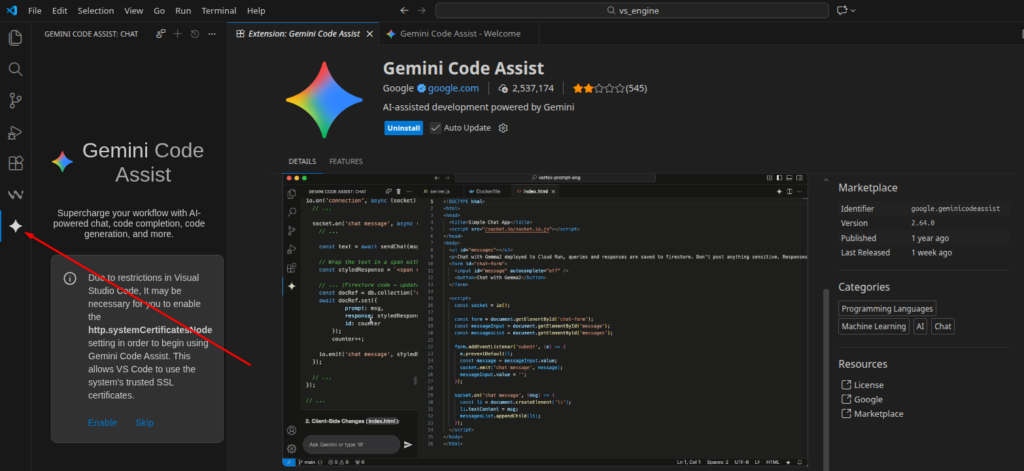
What will this give a professional (DevOps/SEO)?
For your tasks, Gemini Code Assist will work as an advanced “coder-conversationalist”:
- Writing and debugging Bash/Python scripts: You can highlight a piece of code and ask: “Add error handling to this loop” or “Optimize this pipeline.”
- Configuration generation: Quickly create complex Nginx configs (for example, to configure redirects during an SEO migration) or write multi-stage Docker files.
- Code explanation: If you are working with someone else’s Legacy code on GitHub, Gemini can explain the logic of a complex script line by line.
- Unit tests: Automatic generation of tests for your automation tools.
- Vulnerability search: Help in detecting insecure constructs in scripts or Docker images.
What are the advantages over a regular chat in the browser?
- Project context: Unlike the web interface, Gemini in IDE “sees” the structure of your project, open files, and dependencies. This makes the prompts much more accurate.
- Inline autocompletion: It offers code writing options directly as you type (like GitHub Copilot).
- Terminal: Gemini can help you compose commands directly for the IDE terminal.
Important nuance for a number of countries: Sometimes, for the full operation of all Google Cloud Code functions (especially those related to Google Cloud Platform), VPN may be required, although the Gemini chat itself in IDE usually works stably. You may see this message: “Your current account is not eligible for Gemini Code Assist for individuals because it is not currently available in your location.“
Useful links: Google Gemini review and pricing in our catalog